Choose a plan
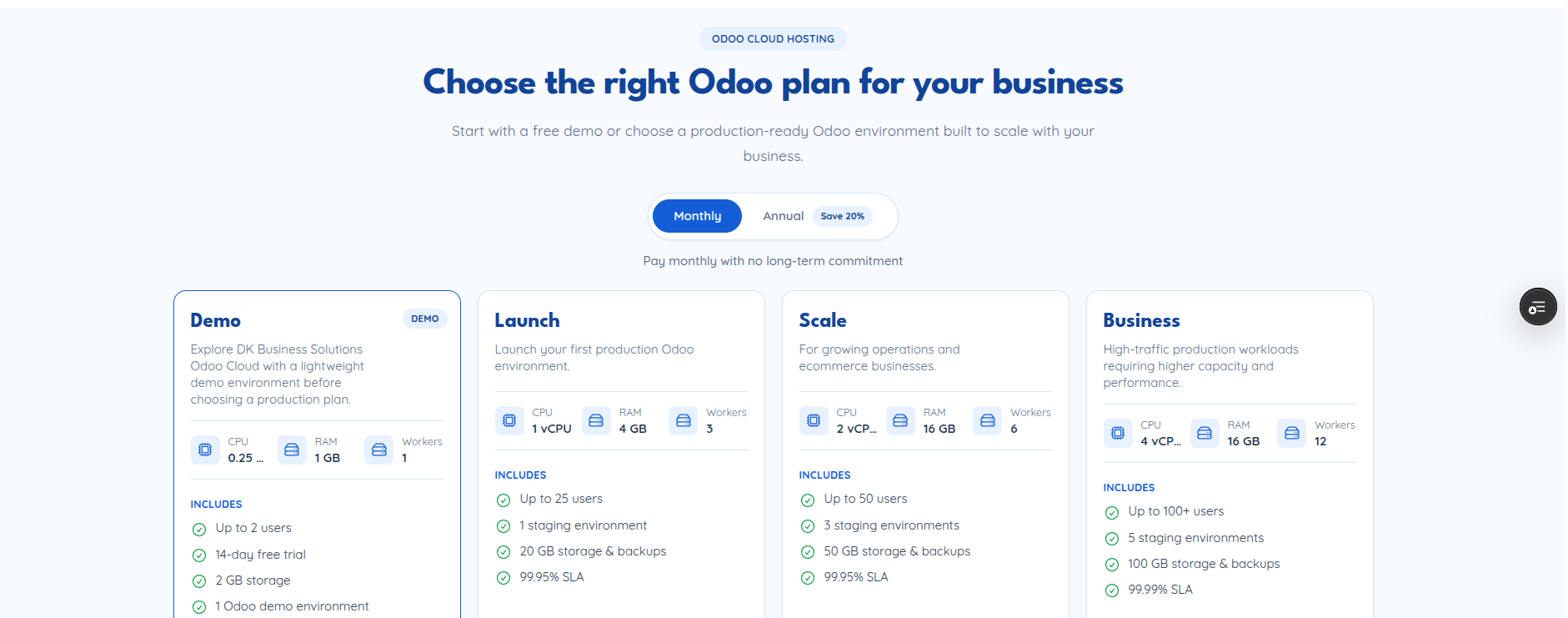
The plans page (/plans) shows the available tiers with Simple &
Transparent Pricing — pick monthly or annual billing, and adjust users and
storage to see the price update live before you commit.
What you can do here
Pick a paid plan — select users, storage, and billing cycle, then continue to checkout with that configuration.
Start a free trial/demo — available plans marked as trial-eligible offer a “start demo” action that skips payment entirely and drops you straight into your dashboard with a temporary instance.
What happens when you pick a plan
Selecting a plan calls POST /api/subscription/select-plan with your chosen
plan, user count, storage, workers, and billing cycle, then carries that
selection forward to registration or checkout depending on whether you’re
already logged in.
Known issue
In the current build, selecting a paid plan navigates to
/subscription/checkout on the frontend, but that route isn’t registered
in the app’s router (only /subscription/confirm is, backed by
SubscriptionConfirm.js) — this looks like a live bug in the plan-selection
flow rather than a docs gap. Worth confirming/fixing before relying on this
page for a real checkout walkthrough.
Starting a demo instead calls POST /api/subscription/demo and takes you
straight to /dashboard.